Next Release - What's coming?
Release Notes
6.4.30 Release Notes - October 2026
6.4.29 Release Notes - September 2026
6.4.29 - 1 - Minor Release - Release Notes
6.4.28.4 - Minor Release - Release Notes
6.4.28.3 - Minor Release - Release Notes
6.4.28.2 - Minor Release - Release Notes
6.4.28.1 - Minor Release - Release Notes
6.4.28 Release Notes - July 2026
6.4.27 Release Notes - May 2026
v6.4.26.1 Release Notes - May 2026 - Minor Release Notification
v6.4.26 Release Notes - April 2026
v6.4.25.1 Release Notes - March 2026 - Minor Release Notification
v6.4.25 Release Notes - February 2026
v6.4.24 Release Notes - January 2026
v6.4.23 Release Notes - December 2025
v6.4.22 Release Notes - October 2025
v6.4.21 September - Minor Release - Release Notes
v6.4.21 Release Notes - September 2025
v6.4.20 Release Notes - August 2025
v6.4.19 Release Notes - July 2025
v6.4.18 Release Notes - 4th March 2025
v6.4.17 Release Notes - 3rd December 2024
v6.4.16 Release Notes - 4th October 2024
v6.4.15 Release Notes - 6th September 2024
v6.4.14 Release Notes - 9th August 2024
v6.4.12 Release Notes - 5th July 2024
v6.4.11 Release Notes - 24th May 2024
Upcoming in the Next Release - Subject to Change - v6.4.21 September
Upcoming in the Next Release - Subject to Change - v6.4.22
Upcoming in the Next Release - Subject to Change - v6.4.28
V6.4.19 Roadmap Upcoming Features (subject to change)
V6.4.18 Roadmap Upcoming Features (subject to change)
V6.4.17 Roadmap Upcoming Features (subject to change)
V6.4.16 Roadmap Upcoming Features (subject to change) 4th October
V6.4.15 Roadmap Upcoming Features (subject to change) 6th September
V6.4.14 Roadmap Upcoming Features (subject to change) 9th August
V6.4.12 Roadmap Upcoming Features (subject to change) 5th July
V6.4.11 Roadmap Upcoming Features (subject to change) 24th May
v6.4.10 Release Notes - 12th April 2024
v6.4.9 Release Notes - 1st March 2024
v6.4.8 Release Notes - 19th January 2024
v6.4.7 Release Notes - 24th November 2023
v6.4.6 Release Notes - 13th October 2023
v6.4.5 Release Notes - 1st September 2023
v6.4.4 Release Notes - 21st July 2023
v6.4.3 Release Notes - 9th June 2023
v6.4.2 Release Notes - 5th April 2023
v6.4.1 Release Notes - 31st March 2023
v6.4.0 Release Notes - 3rd March 2023
v6.3.3 Release Notes - 3rd February 2023
6.3.2 Release Notes - 16th December 2022
v6.3.1.1 (6.3.1.420) - 24th November 2022
v6.3.1 Release Notes - 14th November 2022
Warranted Environment Specification
Upcoming in the Next Release - Subject to Change - v6.4.29
On-Demand Webinars
Navigation
System Admin
Administrator
Reference Data
Email Setup
Setting up Emails
Registering the App
Assigning Microsoft 365 Licences
Configure System Settings for Emails
OneAdvanced Identity (Single Sign-On)
Introduction to Single Sign-On
Syncing a User to Advanced Identity
Authentication Providers (for Reference Only)
Logging in Using SSO for the First Time
Logging in Using MFA
Creating a Business Unit
How to Create a Provider
System Settings for Copying and Ending Staff Contracts
How to Add Public Holidays
Setting up the Address Gazetteer
Integrating Maps for Rostering Travel Time and Distance
Enabling and Disabling Business Modules
Tracing Performance Issues
List of Scheduled Jobs
How to Set up FAQs
System Users
Creating a System User
Assigning System User Personas
Adding Security Profiles to a System User
Removing Security Profiles from a System User
Assigning Home Screens
Deactivating a System User
Removing a System User from a Team
Access to Authorise Forms
Teams
Creating a Team
Change Team Visibility
Adding Team Members
Adding Team Security Profiles
Ending a Team Membership
Moving a Team to a Different Business Unit
Team Codes
Personas
Advanced Search
Views and Dashboards
Introduction to System Dashboards
Creating a System Dashboard
Creating a System Chart
Aggregated Data in User Charts
Adding Widgets to a System Dashboard
Creating a Home Screen
Allocating a Home Screen
Changing the Owning User of an Advanced Search
Tribepad and Access Integration
CM2000 Export
Rostering
Configuring Rostering
Adding Availability Types
Editing Availability Types
Adding Transport Types
Configuring the Delete Booking Dialog
Adding a Booking Deletion Reason
Scheduling Setup
Introduction to Scheduling Setup
Scheduling Setup: Bookings
Scheduling Setup: Bookings Validation
Scheduling Setup: Diary Bookings Validation
Scheduling Setup: Contract Hours Validation
Scheduling Setup: Runs Validation
Scheduling Setup: Wallchart
Scheduling Setup: Bradford Factor Report
Scheduling Setup: Capacity Planning
Scheduling Setup: Employment Contract Continuous Service
Booking Types
Introduction to Booking Type Class
Adding Booking Types: Booking (To Location)
Adding Booking Types: Booking (To Internal Care Activity)
Adding Booking Types: Booking (To External Care Activity)
Adding Booking Types: Booking (To Internal Non-Care Booking)
Adding Booking Types: Booking (Service User Non-Care Booking)
Booking Type Clash Actions
Linking Booking Types to Providers
Using the Provider Schedule
Introducing the Provider Schedule
Adding a Schedule Booking
Setting Occurrence Against Bookings
Validations When Creating a Schedule Booking
Managing Schedule Bookings
Using the Provider Diary
Introducing the Provider Diary
Adding a Diary Booking
Validations When Creating a Diary Booking
Managing Diary Bookings
Scheduling Runs
Publishing Bookings
Offer Bookings
Time and Attendance
Introduction to Time and Attendance
Configuring Time and Attendance Rules
Matching Bookings and Events
Unmatching Events
People
About Me
Care Planning
Introduction to Care Planning
Creating a Care Plan
Adding and Completing Assessment Forms
Adding Attachments Against Care Plans
Adding a Person Risk Plan
Recording Care Preferences
Recording and Managing Regular Care
Problems and Notes
Bookings
Creating and Managing Care Plan Documents
Creating a Person Discharge
Daily Care
Bed Management
Introduction to Bed Management
Creating Sub Locations
Adding Rooms to Sub Locations
Adding Beds to Rooms
Adding a Bed Contract Type
Allocating a Bed to a Person Record
Mark Bed as Unavailable
eMAR for Domiciliary Care
Introduction to eMAR for Domiciliary Care
MAR Schedules
Medication Periods
Medication Diary
eMAR in the Mobile App
MAR Chart
Adding a Person Record
Person Search
Enforce Searches Before Creating Person Records
Managing Existing Person Record
Using Person Tracking for Prospects
Creating Person Specific Training
Adding a Correspondence
Adding a Correspondence via Person Record
Preferences
Compatibility
Charting Review, Sign Off and Export
Finance
Person Contract Services
Finance Codes
Configuring Contract Services
Using Contract Services
Person Contract Service
Adding a Person Contract
Ending a Person Contract
Adding a Contract Scheme
Adding a Service
Adding a Services Detail
VAT Codes Setup
Adding Person Contract Service End Reason Rules
Adding Person Absence Reason Rules
Invoicing and Billing
Finance Invoice Batch Setup
Using Finance Invoice Generation
Finance Extract Batch Setup
Using Finance Extract Batches
Finance Invoice Processing
Charge Apportionments
Payments Against Invoices
Personal Money Account
Using the Finance Module
Providers
Finance Scheduled Jobs
Person Absences
Accounting Periods
Employee Management
Applicants
Adding an Applicant
Schedule Availability
Creating Transport Availability
Adding a New Role Application
Training
Staff Training Items Setup
Training Requirement Setup
Training Course Setup
Adding Training to a System User
Employment
Configuring Employment Contracts Reference Data
Creating Employment Contracts
Ending Employment Contracts
Suspending Employment Contracts
Move to New Employment Contract
End and Create New Employment Contract
Creating an Open-ended Absence
Ending an Open-ended Absence
Removing an Open-ended Absence
Adding Worker IDs
Annual Leave
Payroll
How to Set Up Timeband Sets
How to Set Up a Payroll Batch
How to Set Up a Master Pay Arrangement
How to Confirm Bookings on the Provider Diary
How to View Output of Payroll Batches
How to Download Gross Pay Advice(s)
How to Send Gross Pay Advice(s)
Setting Up Travel Reimbursements
How to use Mail Merge to Download Gross Pay Advice(s)
Payroll Exports
Forms Management and Workflows
Pathways
Introduction to Pathways
Configuring the Pathway Task Catalogue Elements
Configuring the Pathway Setup
Exporting and Importing Pathways
Adding a Pathway
Using Pathways
Data Management
Data Migration
Data Import Procedure Overview
Data Migration Maps
Data Migration Packages
Data Import File
Data Import Processes
Using the Data Import Tool
File Destruction
Duplicate Detection
Creating Duplicate Detection Rules
Viewing Duplicate Records
Merging Duplicate Records
Viewing Merged Records
Unmerging Merged Records
APIs
Mobile App
Web App Configuration
Care Provider Settings
Care Periods
Enabling the Mobile Business Module
Add Mobile User Security Profile to System User
Marking Alert and Hazard Types as Key Risk
Marking Diagnosis as Key Risk
Mobile App Configuration
Using the Mobile App
Bookings With Multiple People (eg BTC2/3 - Supported Living)
Service Endpoint Setup in the Mobile App - Carousel
FAQ
FAQ Glossary of Terms
FAQ How do Care Cloud Finance API’s work?
FAQ - Why can't we see all Residents in the Mobile App?
FAQ - What is the timeout of the Product?
FAQ - Why am I seeing an error message in the Mobile App about option-set data not available?
Why can i see my Booking in the Mobile App but not the Care Plan or Risks?
FAQ - Why is the Employee Type field important when creating a System User record?
FAQ What can be uploaded to Care Cloud?
FAQ What is the Mobile App Timeout?
FAQ - How to Bulk Update a Multi Select Field
Why can i see bookings online but not offline in the Mobile App?
FAQ - Why do i have an error connecting the APIs?
FAQ - Why do Medications show as "Not Recorded" or "No Visit"
FAQ How do i show the Recent Injury Icon in the Mobile Residential Care Resident Dashboard?
FAQ How do i show and End of Life Icon in the Mobile Residential Care Resident Dashboard?
FAQ - How to add a URL to an Invoice to link to Advanced Financials
FAQ How do i control which Care can be given in Ad-Hoc Mobile Tasks?
FAQ - What is the difference between "Move to new Contract" and "End and Create New" for System User Contracts?
FAQ - How is the payment for Annual Leave Calculated?
FAQ - Why Can't I Complete an DNAR Record
- All categories
- Release Notes
- 6.4.27 Release Notes - May 2026
6.4.27 Release Notes - May 2026

Release Dates Information:
Customer familiarisation: 26th May
Release 6.4.27 is scheduled to be applied to your UAT environment on 26th May. This will give you the opportunity to test and familiarise yourself with the new functionalities before the live release.
Available in Live Date: 2nd June
Release 6.4.27 is scheduled to be applied to the Live environment on the 2nd June.
Mobile App Release Process
A Beta Version of the Mobile App should be used for v6.4.27 UAT from 26/05/2026 - please e-mail Mark.Thompson@OneAdvanced.com to be given access to this.
The Live Mobile App release will available between the 25/05/2026 and 26/05/2026 in the Apple and Android Store.
Summary
Areas of focus: Care and Mobile App.
Features: Main focus on Specific Care Tasks per Visit and Non Person Contact Bookings in the Mobile App
Enhancements: key enhancements are Payment Reductions for Cancelled Bookings, "Start Date & Time" added to the MAR Schedules, Provider Contracts
Module/Area | Feature | Mandatory / Optional | Needs configuration (Y/N) | Areas/points to consider during UAT |
Web & Mobile | Specific Care Tasks per Visit | Optional - must be turned on via a system setting to use | Yes | Rostering and Mobile App Visits |
Mobile | Non Person Contact Bookings in the Mobile App | Optional - only applies if non person bookings are being used | No | Booking creation, Booking display |
Web & Mobile | Ability to add the Start Date & Time to MAR Schedules | Optional - only applies if using Medications | Yes | Schedules Care Plans |
Web | Ability to see a more detailed review of the care delivered | Mandatory | No | Care Plan > Care Reviews |
Web | Ability to easily revert a payment which a Staff member has received for a cancelled booking | Mandatory | No | Pay Expenses |
Web | Ability to Manage Provider Contracts | Optional - Added for a future feature to charge Providers for vacant beds | Yes | Provider > Contract |
Web | Ability to Adjust Roster Screen Booking Length | Optional - only impacts bookinsg with Multipel people assigend and with an "indivudle spilt" of hours | No | Rostering |
Web | Ability to View Commissioned Hours on Provider Screens | Optional - applies if using commissioned hours on people contracts | Yes | Rostering |
Features & Enhancements
Web:
Specific Care Tasks per Visit
This new feature is set to improve the care planning process by introducing a more structured and dynamic task management system.
With Specific Care Tasks per Visit, you'll be able to:
- Assign tasks to specific visits, ensuring that care activities are directly linked to the scheduled visit.
- Schedule tasks for particular times, enhancing the organisation and timing of care delivery.
- Link tasks to rostering, streamlining the management of care staff responsibilities.
- Include both mandatory and ad-hoc tasks on visits, providing flexibility and ensuring essential care activities are not missed.
With the introduction of this feature there are now 2 ways which Care can be scheduled and appear in the Mobile App:
For Residential Care (and Bookings linked to 'Booking (to location)' class) there is no impact
For other Bookings - the Care Task which appear in the Mobile can continue to be controlled via:
Person Record > Care Plan > Regular Care
or via each Scheduled and/or Diary Booking.
To switch to a Care Per Booking way for working a setting should be turned on:
- Settings > Care Provider Setup Section > Scheduling setup > Control Tasks And Care In Rostering Schedule - set to Yes
Following the above a new Tab will appear on each booking to select which tasks should be shown, if they are required or not (mandatory tasks which if not done the user must specify why) and what time it should be done by
NOTE:
1) Any Bookings made prior to this setting being turned on will still use the 'Regular Care' task list. Therefor if for example you have booked 1 week in advance, you have 1 week to update the Care Task per Scheduled booking before booking the following week using the new method
2) To continue to use the 'Regular Care' option, no change is needed
UAT Considerations:
If enabling the Specific Care Per Booking:
- Test the assignment of tasks to specific visits and verify that they are correctly linked to rostering.
- Validate the scheduling of tasks for particular times and ensure that they are executed as expected.
- Confirm that both mandatory and ad-hoc tasks are correctly included on visits.
Mobile App:
When using the Residential Care area of the app (also available via Bookings to Locations) the user can now back up to 2 days to see previous Care records for the Person, when the user is Online.
Non Person Contact Bookings in the Mobile App
This update will allow for: Inclusion of all bookings in the mobile app, providing a comprehensive view of scheduled activities.
This includes booking which use a Booking Type Class of 'Booking (to external care activity) ' and 'Booking (to internal non-care booking e.g. annual leave, training) '.
General Enhancements
Ability to add the Start Date & Time to MAR Schedules
A 'Start Date and Time' has been added to the MAR Schedules (Person > Care Plan > MAR Schedules).
These scheduled will not appear in the Mobile App until the stated date.
Ability to see a more detailed review of the care delivered
The 'Care Review' tab within Care Plans has been extended and it includes tasks associated with bookings that are in the form of a Tick Box, offering a better understanding of the care provided.
Ability to easily revert a payment which a Staff member has received for a cancelled booking
Reversing payments for cancelled bookings has become more straightforward.
When cancelling a 'Paid' booking, users are now prompted to add a reversal of the payment in the next payment batch:
What's Included in the Reversal
- The payment for the booking
- Any linked Expenses associated with the booking
What's Not Included
- Recalculations of the National Minimum Wage Top-up received by the Staff member that month
Ability to Manage Provider Contracts
The system now allows for the addition of Provider Contracts with a related Contract Scheme for Providers.
Key Features
- Providers can have Provider Contracts added with a related Contract Scheme.
- The Contract Scheme can be selected on Bookings with Multiple People where the Hours Split is set to "Individual Split".
Future Impact
This feature is a preparatory step for a future release that will use the Contract Scheme to generate invoice records for the Provider.
Current Status
This change currently has no impact on invoices.
Ability to Adjust Roster Screen Booking Length
The system has been enhanced to improve the management of booking durations on the Roster Screen.
When changing a booking duration using drag and release for bookings with Multiple People assigned and where the Hours Split is set to "Individual Split":
- If the booking length is extended, the user will be prompted to review the Hours Allocation before saving.
- If the booking length is shortened, the Hours Allocation will be automatically updated based on the current proportional split.
This update streamlines the process of adjusting booking durations and ensures that hours allocations are accurately managed.
Ability to View Commissioned Hours on Provider Screens
The Provider Diary Screen has been enhanced with the addition of Commissioned Hours totals and indicators.
This update provides a more comprehensive view of commissioned hours directly on the Provider Diary Screen, improving the overall user experience and facilitating easier access to key information.
National Minimum Wage
National Minimum Wage has been extended to support rates for different Roles.
Deprecated Fields
The following fields are been deprecated from the Diary Booking Business Objects, as they are no longer used. These fields should not be used in Workflows and Dashboards as they are not updated with data, but if they have been these should be removed from those areas.
- Actual Start Date
- Actual Start Time
- Actual End Date
- Actual End Time
- Actual Duration Minutes
- Actual Duration Hours
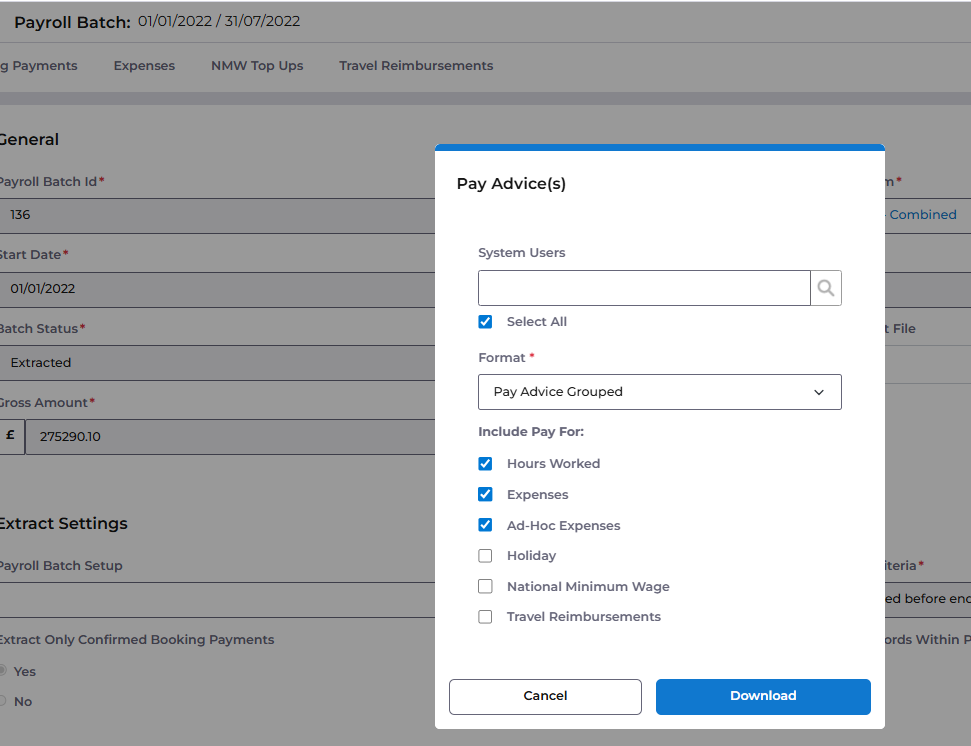
"Pay Advice Detail" Format Update
The existing 'Pay Advice Detail' format now includes a 'Select All' option, allowing for quicker System User selection.
Introduction of "Pay Advice Grouped" Format
A new 'Pay Advice Grouped' format is now available from Payroll Batches. This format provides options for customising the type of Pay information included in the extract, offering greater flexibility and control.
Defects Resolved
Ref | Summary | Area |
ACC-14041 | Resolved an issue causing the Hour a Medication is due to be 1 hour out , when using a routine that has a gap period spanning 2 days | Medication |
ACC-14055 | Resolved an issue preventing the allocation of a Staff member via the right click feature on bookings | Rostering |
ACC-14127 | Resolved an issue preventing user Ending a Visit when the Mobile Rules produced a Null value in the End Time Validation | Mobile Logging |
ACC-14023 | Resolved an issue impacting the population of "Maximum Allowable Distance From Start Location (Miles)" and "Difference Between End Visit and Address (Miles)" from Mobile App Visits | Mobile Logging |
